

Mark Donohue, Managing Director iSky, Global
From payment prompts to channel locks, leading providers are using carefully placed friction to help customers spot risk, act earlier and recover with confidence.
Friction has become one of digital banking’s most charged design words. Teams measure success through speed and the removal of unnecessary steps. In fraud and security, however, the quickest experience is not always the safest.
The better question is whether friction earns its place. A protective pause should capture attention at a meaningful moment, provide relevant context and lead to clear action. Otherwise, it is simply another obstacle.
Five priorities stand out across the global journeys tracked by RFI Global’s iSky Radar UX platform. They are less about adding security content than making each intervention more purposeful.
1. Understand context before intervening
Security journeys are often designed around what the institution needs a customer to complete. Onboarding checklists are a familiar example. This can miss the factors shaping how an individual understands and manages risk.
Accessibility needs, travel, bereavement, financial hardship and household changes can alter the support a customer needs. So can digital confidence. Terms such as ’autofill’ or ’device registration’ may be obvious to a product team and meaningless to the person receiving a warning.
The opportunity is to adapt language, depth and format. Singlife’s former ’Simplify for me’ option pointed to a useful model: offer the same essential message in a form that matches the customer’s capability. Effective security communication starts with the person, not the process. A message customers cannot decode cannot change behaviour.
2. Interrupt at the point of decision
Digital needs restraint. Long fraud explanations, dense login copy and generic scam carousels can all be accurate yet easy to ignore. They compete with the customer’s task.
Account-summary space is especially valuable. Using it for important security or operational communication, rather than routine sales, can teach customers that what appears there deserves attention. Every message still needs a clear call to action.
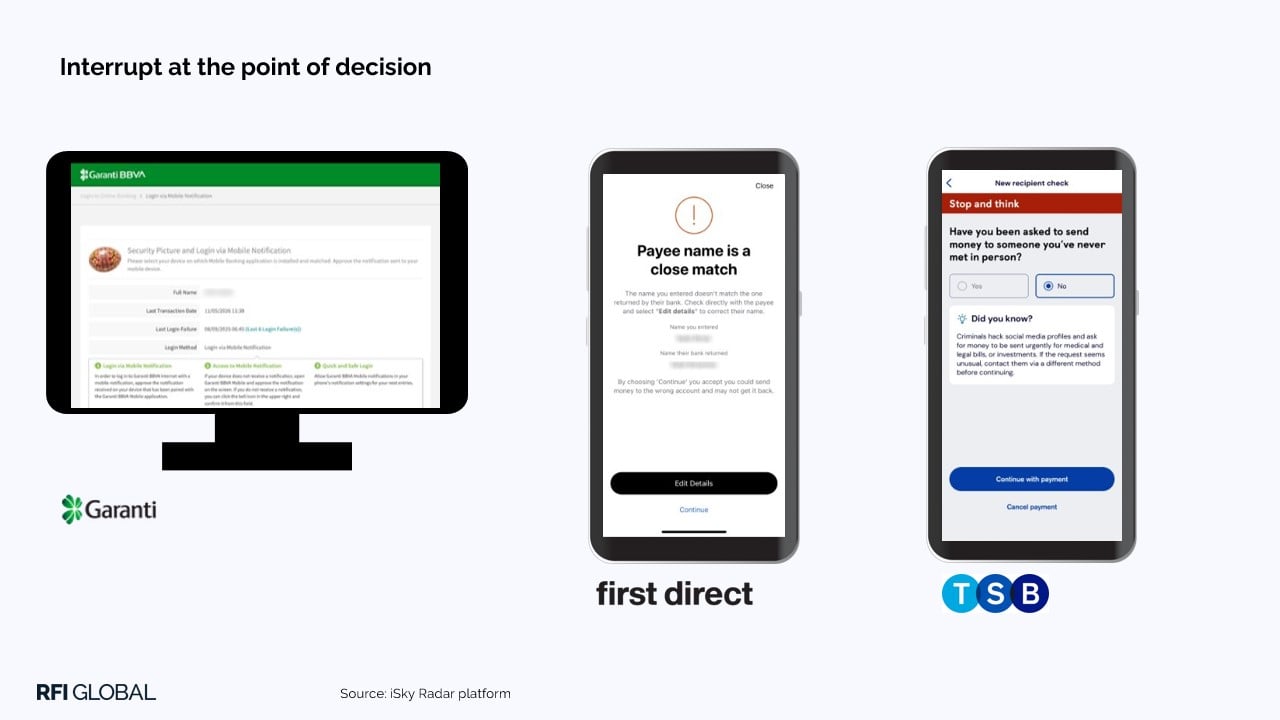
At higher-risk moments, the interruption should be direct. Garanti BBVA uses login to surface recent failed attempts and the last transaction date. In payments, TSB asks customers to consider their relationship with the recipient, while First Direct challenges a close payee-name match. These prompts interrupt autopilot while harm may still be preventable.
Good friction is active, specific and proportionate. It asks the customer to make an informed decision.
3. Move controls upstream
Card locking is now basic. Emerging iSky Radar examples extend the same logic to payments, accounts, channels and customer profiles.
Controls can disable high-risk services, switch off internet banking, set payment parameters, nominate a trusted contact or place funds behind a time lock. Monzo’s trusted-contact model adds a second set of eyes for selected payments. Hang Seng lets customers deactivate risky services, while Up delays access to locked funds, with trusted-contact support for urgent situations.
Security hubs can make these settings coherent, but only if they do more than catalogue features. A better hub shows the customer’s position, identifies gaps and explains each choice, supporting both simple and granular control. It should also show how individual settings work together.
Control must also be reversible. Customers need to know what a lock affects, how long it lasts and how to restore access. Otherwise, a preventive tool may move demand elsewhere.
4. Make activity and status visible
Protective systems see more than customers do. Stronger experiences close that gap by exposing useful activity, not merely offering reassurance.
Bank Australia and Cash App show how activity histories can combine transactions with password changes, security-setting updates and profile access, helping customers decide whether to act.
The principle also applies to processes. CIBC explains payment limits and reset times. ZA Bank provides a journey for requesting the return of a misdirected payment while setting realistic expectations. Wells Fargo shows the status of a transaction dispute. Each answers the question that might otherwise drive a call: what is happening now?
Information creates value when it is timely, understandable and connected to action. Persistent status is particularly valuable after an event, when uncertainty is highest. A raw log is not enough.

5. Guide recovery across channels
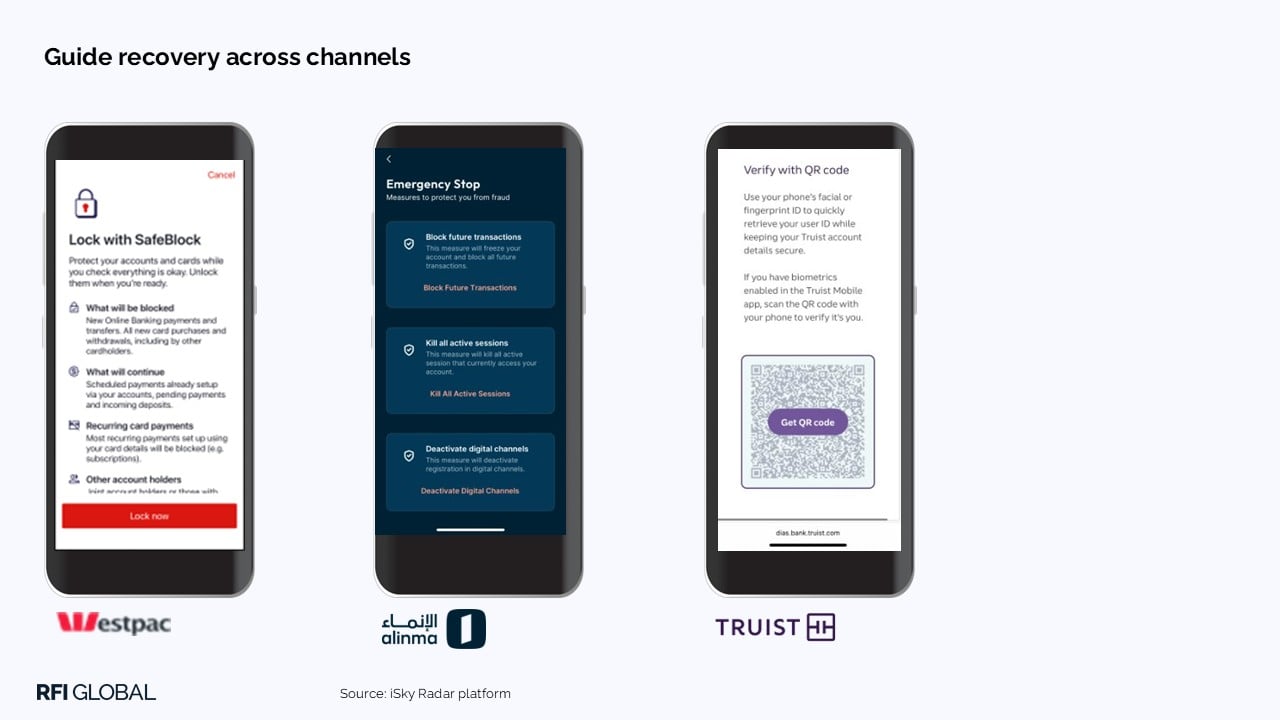
When something feels wrong, fast lockdown matters. Kill switches can stop transactions, end sessions or deactivate digital access. But the button is only the beginning.
Customers need to know what is blocked, what remains available and what to do next. Westpac’s SafeBlock connects emergency response with other controls. Alinma combines device deregistration with ending active sessions. Truist uses a registered mobile app and QR scan to help customers recover web access.
Recovery should be a guided journey, not disconnected security events. The institution’s job is to turn urgency into orderly action.
Make every pause do useful work
The choice is not between a frictionless experience and a heavily restricted one. It is between friction that protects and friction that merely delays.
Before adding another warning, confirmation or lock, teams should ask: Is this the right moment? Does the customer understand why? Is there a meaningful action? Is the route forward clear?
When the answer is yes, friction becomes a moment of clarity that helps customers recognise risk, decide and regain control. The challenge is not to remove every pause, but to make every protective pause do useful work.
If you’d like to find out more about best practice UX, join our free webinar where we will reveal the top 20 banking apps worldwide and explore what drives their success.

Mark Donohue
Managing Director iSky, Global
Mark Donohue is Managing Director of iSky at RFI Global, working with clients globally on data-led financial services intelligence.
View full profileFrequently Asked Questions about bank branches
Q: How can banks balance fraud prevention with a frictionless digital experience?
Banks should not aim to remove all friction from fraud and security journeys. Instead, they should use appropriate friction at moments when customers need to recognise risk, make an informed decision or regain control. Each intervention should explain why it is needed, offer a meaningful action and provide a clear route forward.
Q: What makes security friction effective rather than frustrating for customers?
Effective security friction is timely, specific and relevant to the customer’s situation. It captures attention at a meaningful moment, provides understandable context and leads to a clear action. Banks should also adapt the language, detail and format to customers’ accessibility needs, circumstances and level of digital confidence.
Q: Where should banks place fraud warnings in digital banking journeys?
Fraud warnings should appear at the point of decision, particularly during higher-risk activities such as logging in or making a payment. Direct prompts can interrupt automatic behaviour and encourage customers to consider unusual activity, their relationship with a payment recipient or a close payee-name match before proceeding.
Q: What fraud and security controls should banks give customers?
Banks can give customers greater control by allowing them to restrict high-risk services, disable digital banking access, set payment parameters, nominate a trusted contact or place funds behind a time lock. These controls should clearly explain what will be affected, how settings work together and how customers can restore access.
Data-driven insights for financial service leaders
Subscribe to The Banknote, our monthly newsletter delivering expert perspectives and exclusive analysis, powered by 200,000 consumer and 60,000 business interviews each year to help you stay ahead in a fast-changing financial world.
